August 24, 2026
Pay Advance Apps: How Payroll-Linked Early Pay Works
See how pay advance apps move money through payroll, who pays Payactiv, DailyPay, and Branch fees, and what it costs versus overdraft.
Read article


Picture Marisol, who runs a forklift on the second shift at a distribution center outside Atlanta. Payday lands every other Friday, and her car needs a $100 repair on a Tuesday. She doesn't need $500, and a loan with a repayment schedule stapled to it isn't what she's after.
She needs a $100 cash advance app that can get her that exact amount today, and she needs to know it won't cost her more than it's worth. That's the question this piece answers: which cash advance apps actually hand a new or low-history user something close to $100, and what that specific amount costs once you count the fee for getting it fast.
If you've searched for a $100 cash advance app, you've probably already noticed the ads don't match the offer. Every app leads with its biggest number. Reality, for a first-time user, looks a lot smaller and a lot more specific.
Cash advance apps market their ceiling because it's the number that gets clicked. "Up to $500." "Up to $750." What they don't put in the headline is that a brand-new account, with no deposit history and no track record inside the app, almost never sees that ceiling on day one.
Chime MyPay is upfront about this in its own product details: most members' starting limit runs $40 to $100, and it scales toward $500 only as direct-deposit history builds up over time. That's the real starting point for someone in Marisol's position, disclosed right on Chime's own page.
Klover takes the gap even further. It advertises a $750 maximum Balance Advance, but a new user can't touch any advance, not $100, not $20, until they've had three consecutive direct deposits land in their account, which works out to roughly six weeks of history.
If you need $100 this week, Klover simply isn't an option yet. That's a real, disclosed limitation, and it doesn't reflect poorly on the app itself. It just means the timeline doesn't fit a reader who needs cash before Friday, so save it for later in your rotation.
The lesson carries across the category: the number on the homepage describes what a loyal, long-tenured user might eventually reach. It says almost nothing about what shows up in your app on day one. If you're shopping for a bigger advance down the road, that's a separate conversation, one this site covers directly if you need more than $100. For now, the useful question is what determines your first advance, not the app's advertised ceiling.
Four apps in this space publish their own pricing pages. Two of them, Chime and Dave, disclose enough to work out exactly what a $100 advance costs; the other two require some interpretation. A few others are worth mentioning too, with the caveat that their numbers come from third-party reviews rather than the companies' own disclosures.
Chime's own product page puts most members' starting limit at $40 to $100, with room to grow toward $500 as your direct-deposit history builds. Instant transfer costs 3% of the advance amount, with a $2 minimum and a $5 maximum, while a standard transfer that lands in about 24 hours is free. There's no subscription fee and no required tip. For someone who just needs $100 and can plan a day ahead, that's a genuinely free option.
Dave's fee schedule charges 1.5% of the amount transferred for express delivery to an outside bank account, and nothing at all if the money goes to a Dave checking account instead. A $5 monthly fee applies only if there's been no deposit or withdrawal activity on the account for 12 months or more. Dave publishes more than one version of this fee schedule, so confirm the one that applies to your account in-app.
If a balance goes negative, the overdraft service fee runs 5% of the overdrawn amount, with a $5 minimum. For a reader who only needs $100 and has a Dave account to send it to, that's another route to a zero-fee advance, so the choice between Chime and Dave often comes down to which one you already bank through.
MoneyLion advertises Instacash up to $500 for new users right on its own product page. Standard delivery is free, landing in 1 to 2 business days to a MoneyLion Spend account or 2 to 5 days to an outside bank. An optional "Turbo" instant-delivery fee applies if you want the money faster, but MoneyLion doesn't publish the exact fee tiers in the page text itself, that table lives inside the app once you're logged in.
If speed matters to you, check that fee in-app before you commit rather than guessing at a number. And as with the other apps here, the $500 headline describes the ceiling; a first-time, low-history user typically sees far less on their opening advance. Treat the standard, free delivery window as your baseline and decide from there whether the Turbo fee is worth paying.
Klover's Balance Advance tops out at $750, with an express fee described as "up to $37.49" at that maximum, which works out to roughly a 5% cap, per Klover's own pricing page. Klover doesn't publish a fee table for smaller amounts, so a precise dollar figure for a $100 advance isn't something the company discloses in text.
If that same proportional cap held at smaller amounts, a $100 advance would land somewhere around $5, but confirm the actual number inside the app before you rely on it. The bigger issue for a reader who needs $100 now is the six-week wait for eligibility mentioned above. Klover is worth bookmarking for later, once you've built a bit of deposit history. It simply can't help with this week's gap.
These three come up constantly in cash advance app comparisons, and each is worth a plain-language mention, with the honest caveat that their current fee and limit figures weren't independently verifiable against a fetchable company page during this research. EarnIn's advance limit for new users tends to start small and grow as the app collects more of your deposit history, and it's capped lower for residents of New York.
Brigit's advertised range runs from a modest floor up toward several hundred dollars, with new accounts typically starting well below that top end. Empower rebranded to Tilt in August 2025, and its structure has historically included a small monthly subscription alongside advance access. If any of these three fits your situation, check the current fee schedule directly in the app before you request anything, since third-party reviews don't always match what's live on a given account.
Here's where the math gets concrete, using the two apps with published, verifiable fee percentages. Say you request exactly $100 from Chime MyPay and you want it in your account within minutes. The instant transfer fee is 3% of the advance, so 3% of $100 comes out to $3.00. Wait 24 hours instead, and the standard transfer costs nothing, per Chime's fee schedule.
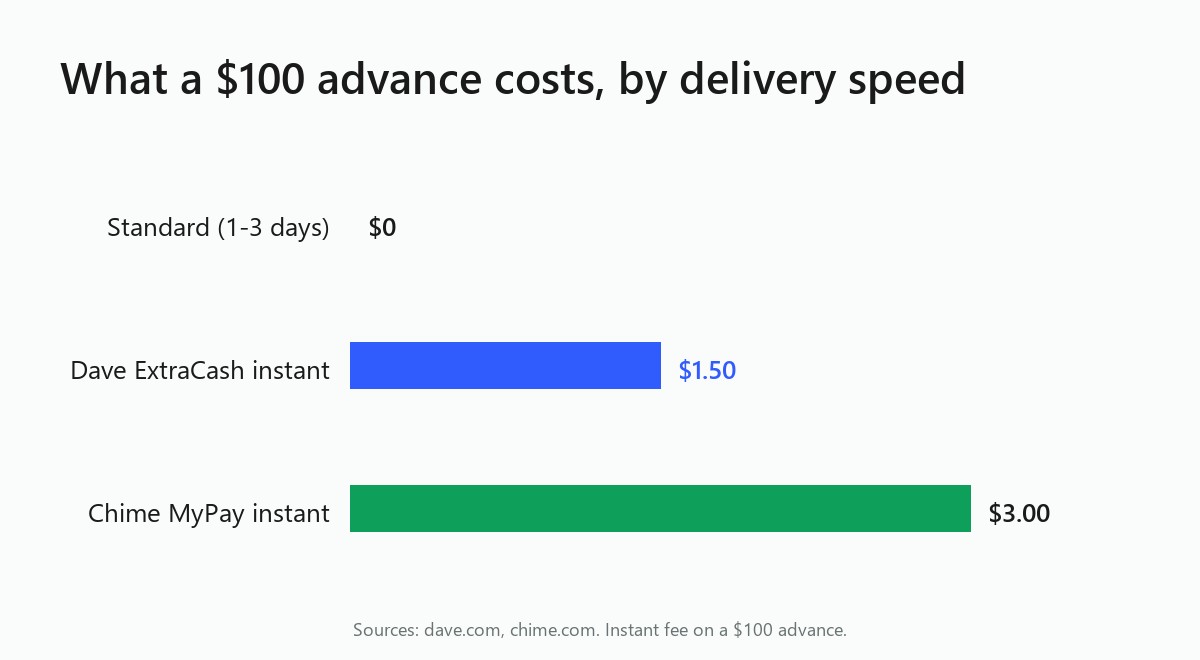
Now run the same $100 through Dave ExtraCash, sent instantly to an outside bank account. The express fee is 1.5% of the amount, which comes out to $1.50 on $100. Send it to a Dave checking account instead of an outside bank, and the transfer is free.
Those numbers look small in isolation, and for a single advance, they are small. But it helps to see what a $3 or $1.50 fee looks like when you stretch it out to an annual rate, the way you'd compare a credit card APR. This isn't a disclosed interest rate on either product, and neither app charges interest, but the comparison shows what the fee costs relative to how long you're actually holding the money. The math below assumes a 7-day repayment window, roughly the gap between paychecks for many hourly workers:
Again, that's a comparison tool, not an interest rate either company discloses or charges. It's meant to help you weigh a $3 instant fee against, say, an overdraft charge or a late fee on a bill. That kind of cost comparison is part of what the CFPB's proposed rule aims to make visible through clearer fee disclosure.
In 2024, the agency took the position that tips and expedited-transfer fees on paycheck-advance products function like finance charges, and it proposed an interpretive rule to make sure workers see the true cost before they use these products. An instant fee is a real cost of borrowing, even when nobody calls it interest. For a fuller breakdown of how these fees stack up across products, see what a $100 advance really costs in more depth.
It's tempting to request the biggest advance an app will give you, just in case. Resist that. A smaller, exact advance beats a maximum advance in a few concrete ways.

First, it shrinks what you owe on payday. Borrow $100 and your next paycheck absorbs a $100 hit. Borrow $400 because the app offered it, and that same paycheck takes a much bigger bite, whether or not you actually needed the extra $300.
Second, on apps that charge a percentage fee, the dollar cost scales directly with the amount you take. Chime's 3% instant fee is $3 on a $100 advance and would be $15 on a $500 advance. Dave's 1.5% fee is $1.50 on $100 and would run $7.50 on $500.
The rate stays the same either way, but the dollar amount you actually pay does not. Borrowing only what you need keeps both numbers, the balance and the fee, as small as the situation allows.
There's a behavioral piece here too, and it's worth saying plainly: a bigger balance sitting in your account is easier to spend than a precisely-sized one earmarked for a car repair or a utility bill. Requesting exactly what the gap requires is one of the simplest ways to keep an advance from becoming a habit rather than a one-time bridge.
Back to Marisol. Her car repair is $100, so that's the exact amount she requests, even though her app might offer more. She already banks with Dave, so she sends the advance to her Dave checking account and pays nothing for the instant transfer. Her next paycheck absorbs a $100 hit instead of a bigger one, and the repair gets paid before Tuesday's shift.
Set the request amount to match your actual gap. Look for the field where you can type in or adjust the dollar amount, set it to $100 (or whatever your gap actually is), and confirm before you tap through.
It's also worth checking the delivery speed screen at the same time. If your $100 doesn't need to land in the next hour, choosing standard delivery over instant is the single easiest way to turn a $3 or $1.50 fee into $0. That choice is one extra tap and it's the cheapest lever available on either Chime or Dave. Understanding how these apps decide your first advance, and how they price speed, puts you in a better position to make that call each time instead of defaulting to instant out of habit.
Before you tap confirm, double-check which account is set to receive the money. A payment sent to the wrong linked bank account, like an old one you closed after switching banks, can turn a "quick" $100 into a multi-day headache. A quick glance at the account nickname or last four digits on the confirmation screen is enough, and that habit will save you more time than any instant-transfer fee ever costs you.
Approval for a $100 cash advance typically comes down to your deposit history, account activity, and how long you've used the app, factors the app can see directly from your linked bank account. That's why a brand-new account often starts with a smaller limit than a longtime user. Confirm the eligibility requirements on each app's own page before you apply.
Based on each app's own published fee schedule, Dave ExtraCash's 1.5% instant fee ($1.50 on $100) costs less than Chime MyPay's 3% instant fee ($3.00 on $100). Sending the advance to a Dave checking account, or waiting 24 hours on Chime's standard transfer, brings the fee to $0 on either app.
Often, yes. Chime MyPay's own disclosures put most members' starting limit at $40 to $100, well under its advertised ceiling. Klover requires three consecutive direct deposits, roughly six weeks, before any advance is available at all. A new account almost never starts at an app's advertised maximum.
A $100 advance repaid on your next paycheck carries a small, fixed fee, as low as $0 on Chime or Dave if you skip instant delivery. Payday loans typically involve rollovers that can add up over time. The CFPB has flagged that advance fees function like finance charges, so treat the fee as a real cost either way.

See how pay advance apps move money through payroll, who pays Payactiv, DailyPay, and Branch fees, and what it costs versus overdraft.
Read article
Cash advance apps were built around a steady paycheck. See what counts as gig income, why your limit is low, and how to actually qualify.
Read article
Does my employer offer daily pay? How to find out whether on-demand pay is available at work, who to ask, and what to expect.
Read articleSee how the top earned wage access apps stack up on fees, limits, and speed. View the full ranking