October 1, 2026
Cash App Borrow: Real Limits, Fees & APR (2026)
Cash App Borrow lets you take $20 to about $500 for a flat fee with a real APR equivalent. See how to unlock it and how it compares to an EWA advance
Read article

Say your landlord takes rent in cash on the first, and you come up short. You pull what looks like the fastest fix: an ATM cash advance app that promises money before payday. But the advance doesn't hand you cash. It lands inside the app, a number on a screen you still have to turn into actual bills before the landlord's deadline, the same way a delivery driver waiting on a payout still has to find a machine willing to hand over cash before the next shift starts.
That gap, between an approved advance and cash you can hold, is what sends people searching for an ATM cash advance app in the first place. Most cash advance roundups answer a different question: how fast does the money hit your bank account. That's useful if you bank digitally and pay everything by card. It's close to useless if you're paying a cash-only landlord or a laundromat that never bothered installing a card reader.
Here's the real split. Some apps issue their own debit or prepaid card tied to the advance, and you can walk that card to an ATM the way you would any bank card. Others only ever move money into a bank account you already have, which means any cash you eventually get comes from your own existing debit card, not the app's.
Every cash advance app answers the same question, how do I get money before payday, but they don't all answer it the same way. Some issue a physical or virtual debit card of their own, funded the moment your advance clears, and that card works at an ATM like any normal bank card would. Others simply push the advance into your existing checking account, the same one your paycheck already lands in.
The second path gets marketed with language like "instant to card" or "instant cash out," and that phrasing sounds like the app just handed you a card of its own. Read past the headline and you'll usually find it means instant to your card, the one from your own bank, that you linked when you signed up. If you don't have a strong banking relationship, or you're avoiding your bank account for a reason of your own, that distinction is the whole ballgame, and it's worth asking directly before you download anything new.
Employer-run earned wage access programs, the kind built into a company's payroll rather than a standalone app a worker downloads, split the same way. Some route pay to a card the program issues; others deposit into the account that already receives your direct deposit. If you want the full picture of that cycle before comparing apps, see how the deposit-to-repayment cycle works.
Picture a server working the lunch shift who gets tipped out in cash at close but banks with a chain branch three towns over. An advance that only lands in her checking account still means a trip to her own bank's ATM, plus whatever out-of-network surcharge that bank charges on top of anything the advance app adds. An advance riding on a card the app issues skips one of those fee layers entirely, which is the whole reason this distinction is worth sorting out before you pick an app.
A handful of apps issue their own debit or spending card, and that card is what makes an ATM withdrawal possible in the first place. Search results and app-store descriptions often blur an "instant cash advance to debit card app" (your existing bank card) with a "cash advance app with debit card" (the app's own card), and the two aren't interchangeable. What's actually confirmed about each app that issues its own card, and where the trail runs cold, breaks down below.
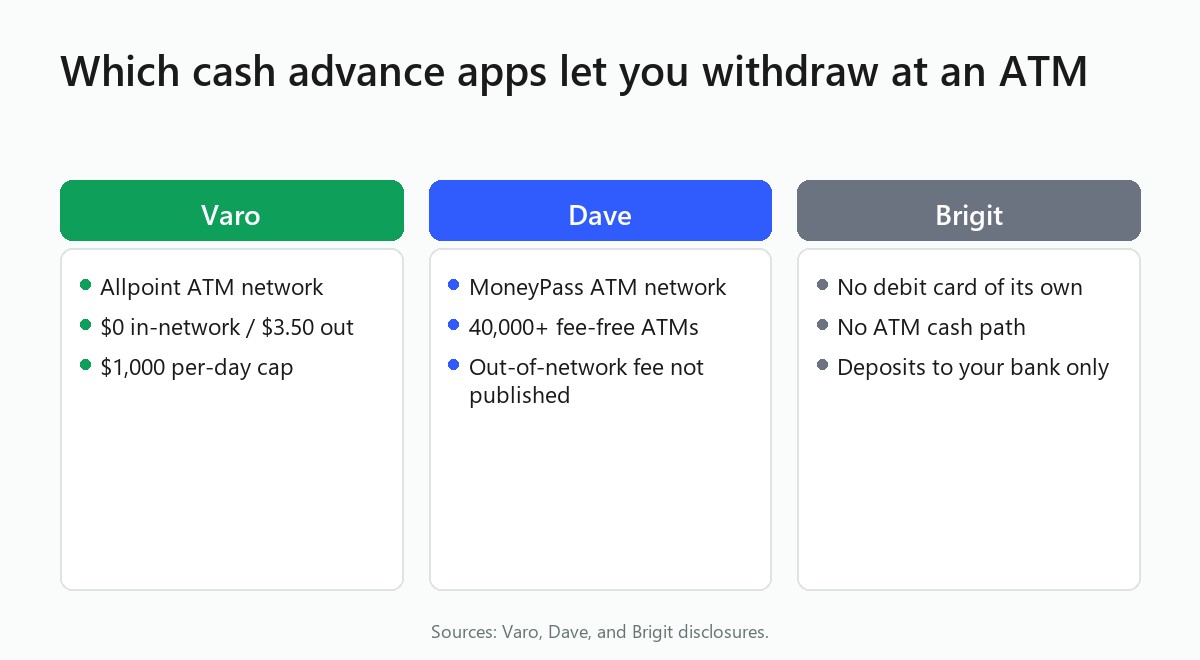
Varo Bank issues its own Visa debit card, and it's the clearest example in this category because Varo actually publishes the numbers instead of burying them. The card rides the Allpoint network, and Varo waives the fee at any of its more than 40,000 Allpoint ATMs, the kind you'll find inside a CVS or a Walgreens. Step outside that network, or use an ATM abroad, and Varo charges $3.50 on top of whatever surcharge the ATM's own owner adds. Varo also caps withdrawals at $1,000 per calendar day at Allpoint machines, according to Varo's own ATM support page.
If you're weighing whether a new cash advance app is even worth setting up, Varo's help page is worth reading first. It's rare to find a card issuer that spells out the network, the exact fee, and the daily cap on a single page, and that kind of transparency is exactly what a cash-preferring worker needs before committing to a new account and a new direct deposit.
Dave's ExtraCash advance can land on the Dave debit card, and that card runs on the MoneyPass network, with more than 40,000 fee-free MoneyPass ATMs nationwide, according to Dave's own ATM page. What Dave doesn't spell out on that page is the exact dollar fee for using an ATM outside that network. The page simply notes that a fee "may apply" without naming an amount. If you're planning to step outside MoneyPass, check the fee schedule inside the Dave app before you swipe, rather than assuming it matches Varo's $3.50 or any other number you've seen floating around online.
Four more apps are commonly reported to issue their own debit or spending cards tied to an advance: Current, Empower, MoneyLion (through its RoarMoney card), and Albert. Current and MoneyLion are commonly reported to run on the Allpoint network, the same one Varo uses, though neither company's own help center independently confirms the exact out-of-network fee or daily cap in a way this article can print as verified. Current's account agreement and independent reporting are both reported to put a $2,000 per day combined limit on card purchases, ATM withdrawals, and point-of-sale cash back, even though the exact out-of-network ATM fee itself isn't confirmed. Empower's own ATM network could not be confirmed for this article, so don't assume it matches Allpoint or MoneyPass.
Albert's card exists, but this article couldn't confirm its in-network ATM fee from Albert's own current fee schedule. A figure a search turns up conflicts with what the card issuer's own disclosure appears to say, and nothing available this round resolves which one is current. Open the app's fee schedule before your first withdrawal.
Fee schedules on these four apps shift, and the numbers a quick search turns up aren't reliable enough to print here as settled fact.
Two apps worth naming take the opposite approach: they never issue a card at all, no matter how the marketing copy reads. For a reader who already trusts their own bank's debit card and just wants the deposit to arrive faster, that setup works fine. The friction only shows up when the goal is cash in hand from a card the advance app itself provided.

Brigit deposits every advance straight into your linked bank account, full stop. Its faster paid option, Express Delivery, reads the debit card you already have on file, the one issued by your own bank, in order to speed up the transfer. Brigit itself has no proprietary card you could put in an ATM, according to Brigit's own product page. If you're chasing cash in hand rather than a faster balance, Brigit isn't the tool for that job, no matter how quickly the deposit clears.
Possible Finance works the same way for this purpose. Possible's own product page describes the advance paying out to your linked bank account or an existing debit card, and nothing in its materials describes the separate Possible Card as a way to receive advance funds. For both apps, "instant" describes how fast the deposit reaches your bank, and the actual cash-out step still runs through your own card and your own bank's ATM network, with whatever fees your bank already charges you on a normal day.
Getting an advance onto a card is only half the job. Here's what actually happens between an approved advance and bills in your hand, whether it's Varo's Allpoint card, Dave's MoneyPass card, or one of the less-documented cards you're checking for yourself.
None of these steps takes more than a couple of minutes once you know your card's network. Skip them, and an out-of-network surcharge can eat a chunk of the cash you were trying to withdraw in the first place.
What's actually confirmed for each app is gathered here in one place, instead of scattered across three different help centers. A driver, a server between shifts, or anyone else who needs bills rather than a balance should read this list before downloading anything.
None of this replaces reading the app's live fee schedule the day you actually plan to swipe a card at a machine you've never used before. If Varo's $1,000 daily cap feels small next to what you actually need in a given week, it's worth comparing apps ranked by how much they'll advance before you settle on one. And if a monthly subscription fee bothers you more than a $3.50 ATM charge ever will, look at apps that skip the monthly subscription instead. Either way, before you hand any app read access to your bank account and your paycheck history, it's worth understanding how these apps handle your bank access in the first place.
Knowing the $3.50 out-of-network fee and the $1,000 daily cap ahead of time means you can plan a withdrawal instead of guessing at the machine. If your landlord still wants rent in cash, that's the difference between showing up short and showing up with exactly what you need.
Only if the app issues its own debit or prepaid card. Varo and Dave both do, and each card works at ATMs inside its own network, Allpoint for Varo and MoneyPass for Dave. Apps like Brigit only deposit to your existing bank account, so any cash you pull still comes from your own bank's debit card, not the app's.
It depends on the app and isn't standardized across the category. Varo confirms the Allpoint network on its own support site, and Dave confirms the MoneyPass network on its own site. Current and MoneyLion are commonly reported to use Allpoint as well, but neither company publishes a fee this article could verify.
The fee depends on whether the machine sits inside the app's own network. Varo waives the fee at its more than 40,000 Allpoint ATMs but charges $3.50 out-of-network, plus whatever surcharge the ATM owner adds. Dave's MoneyPass ATMs are fee-free in-network, but Dave doesn't publish an exact out-of-network fee, so check your in-app fee schedule before withdrawing outside MoneyPass.
You'll need to wait for the limit to reset or use a different withdrawal method. Varo caps ATM withdrawals at $1,000 per calendar day at Allpoint machines, and other card-issuing apps set their own daily caps. Once you hit the limit, the ATM declines further withdrawals until it resets, regardless of how much advance balance remains sitting in the app.

Cash App Borrow lets you take $20 to about $500 for a flat fee with a real APR equivalent. See how to unlock it and how it compares to an EWA advance
Read article
Cash advance apps without a bank account are rare. See which ones actually work with a prepaid card or Chime, Varo, or Cash App instead of a bank.
Read article
Only need $100 to payday? See which cash advance apps actually front $100 to new users, and what it really costs with instant fees.
Read articleSee how the top earned wage access apps stack up on fees, limits, and speed. View the full ranking