September 28, 2026
Gerald Cash Advance App Review 2026
Gerald advertises zero fees, but a store purchase unlocks the transfer. Limits, speed, eligibility, and who it actually suits.
Read article


If you bank with Chime and typed "cash advance app that work with chime" into Google, you're probably staring at a gap between paychecks and wondering what actually links to your account. Chime already builds two advance tools into its own app, SpotMe and MyPay, and those come first because they're free or close to it and there's no linking step at all. After that, the honest answer gets narrower than most roundup articles let on. Checking the official help pages for the apps that show up on every "works with Chime" list turns up only two: EarnIn, which confirms it directly but only for a limited group, and Brigit, which names Chime as a supported bank without a Chime-specific fee or limit attached.
The rest don't confirm Chime on their own pages. That distinction matters more than it sounds. A bank showing up in an app's Plaid connection list is not the same as that app's own support team confirming it works.
Plaid links thousands of banks by default, so presence on that list proves almost nothing on its own. An app's help center naming Chime, in writing, is a different and much stronger signal. If Plaid itself is the sticking point rather than any single app's Chime coverage, a separate guide to cash advance apps that skip Plaid entirely may be more useful than this one.
SpotMe is Chime's fee-free overdraft feature, and it's worth checking before you go looking at any third-party app. Say you're short on cash and payday is two days out. SpotMe covers overdrafts on your account, up to your approved limit, with no overdraft fee at all.
According to Chime's own help center, SpotMe starts at a $20 limit and can grow to a maximum of $200 based on your account history, deposit frequency, and spending activity. There's no fee to use it. To qualify, you need an activated Chime Visa debit card (a secured Credit Builder or secured credit card also counts) and at least one qualifying direct deposit of $200 or more within the past 34 days. Chime spells out how the limit gets calculated on a separate help page, and the short version is that it moves up gradually the longer you bank there and the more consistent your deposits look.
One thing worth knowing for the record: per Chime's own SpotMe agreement, SpotMe and MyPay are delivered through Chime's bank partners, The Bancorp Bank or Stride Bank, not through Chime directly. Chime is the app you see, the bank behind it is doing the actual account work.
If $200 isn't enough, MyPay is Chime's second built-in option, and it goes further. According to Chime's own MyPay page, eligible members can advance between $20 and $500 per pay period, with some members able to access up to $1,000. The same $200-plus qualifying deposit threshold applies. Instant delivery costs a 3% fee, with a $2 minimum and a $5 maximum per transfer.
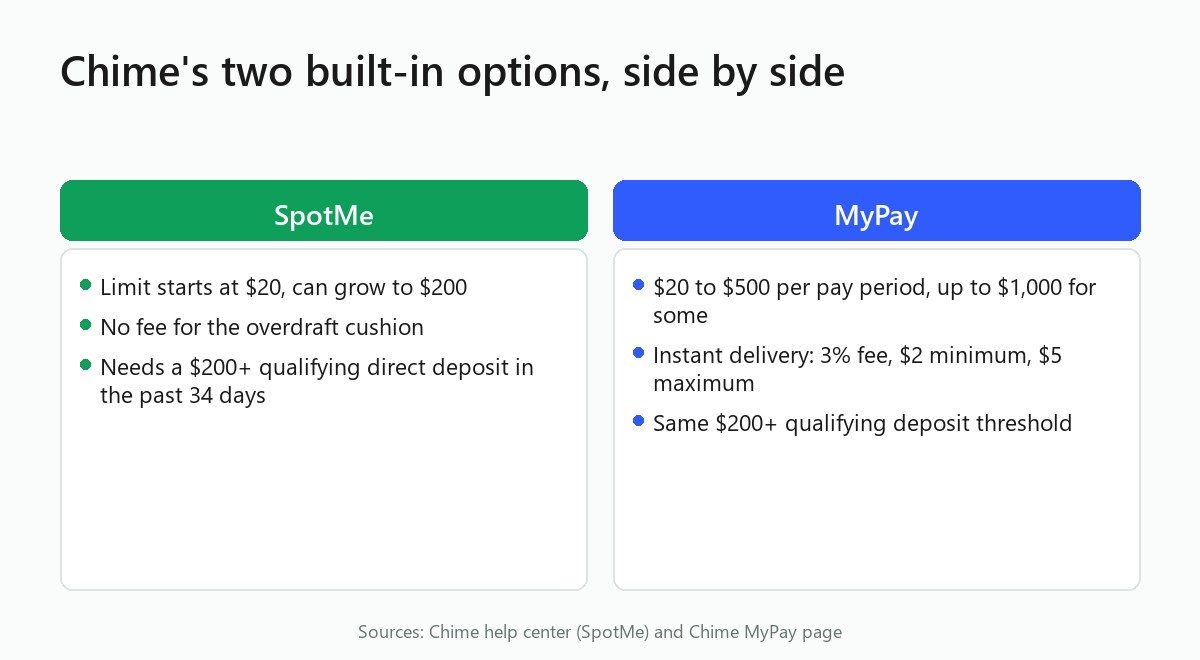
Run the math on a $300 advance: 3% is $9, but the $5 cap kicks in, so you'd pay $5 for instant delivery, not $9. On a $60 advance, 3% is $1.80, so you'd pay the $2 minimum instead. Either way, the fee tops out at $5 no matter how large the advance gets, which is a low ceiling compared to what some third-party apps charge for the same instant-delivery convenience.
Here's where the numbers Chime confirms on its own pages line up against what third-party apps confirm, or don't, on theirs. "Confirmed" here means the app's own help center or support page states the fact in writing, not that a listicle or a Plaid bank list includes the name.
Notice how thin that "confirmed" list really is once you require an app's own documentation rather than a database of linkable banks. That's the whole point of checking the primary source instead of trusting a table someone else already built.
EarnIn is the one app on this list with a help article that addresses Chime by name. The article is literally titled "Does EarnIn support Chime?" on EarnIn's own help center, and the answer inside it is more careful than a flat yes.
Support is limited to a rolling test group of users, not every Chime account holder. The reason given is specific: many Chime members get paid up to two days early, and that timing threw off EarnIn's repayment-date logic, which is built around when a paycheck is expected to land. Because of that mismatch, Chime support rolled out gradually instead of opening to everyone at once.
If you bank with Chime and want to try EarnIn, open the app and check its bank-selection search field. If Chime shows up as an option when you search for it, your account is part of the group EarnIn currently supports. If it doesn't appear, it isn't yet. Read compareEWA's full EarnIn review for its broader fees and limits.
EarnIn's help article also notes that you need to enable "Allow Transactions" inside Chime so EarnIn can debit the repayment when it's due.
Brigit's own help center has an article titled "What Banks Does Brigit Work With?" that describes its connection through Plaid to more than 6,000 banks, and it names Chime specifically as an example alongside Bank of America, Wells Fargo, and Chase. That's a genuine confirmation because Brigit's own support team chose to list Chime by name, rather than something inferred from a Plaid database.
What Brigit's help center doesn't spell out on that page is a Chime-specific fee schedule or advance limit. Treat the bank-support confirmation and the pricing details as two separate questions. If you're a Chime member considering Brigit, the account linking itself should work, and what you pay once it does depends on Brigit's general fee structure rather than anything Chime-specific. See compareEWA's Brigit review for those numbers.
Empower rebranded to Tilt in August 2025. Tilt's own help center describes an optional instant-delivery fee for cash advances, but the support article itself doesn't publish a specific dollar figure. That instant delivery is fee-free only when it lands on a Tilt-branded debit card account; sending the advance to an external bank, which is what a Chime deposit would be, carries the fee.
What Tilt's own pages don't do is confirm Chime as a supported linked bank by name. Treat both the fee amount and Tilt's Chime compatibility as unconfirmed until its own help center spells them out.
Klover's own help center confirms there are two ways to receive an advance: a free standard transfer, and a paid express or instant option. That much is documented directly by Klover, but the article doesn't list a dollar figure for the instant fee. Klover's help article also doesn't name Chime as a supported bank.
If you see a specific instant-fee number attached to Klover on a comparison site, check Klover's own pricing page directly for the current figure rather than trusting a third-party comparison site's number. Numbers that trace back to a third-party aggregator rather than Klover's own documentation aren't reliable enough to plan a payday around.
Dave's own support article on connecting an external bank account walks through the general Plaid-linking flow, the same process used for any bank in Plaid's network. It does not name Chime specifically, one way or the other.
The honest read is that Dave's own pages neither confirm nor deny Chime compatibility. If Chime linking works for you through Dave's Plaid flow, that's consistent with how Plaid generally functions across supported banks, but it isn't something Dave itself has put in writing. compareEWA's full Dave review covers its fees and limits in more depth.
Cleo's own official FAQ, titled "What banks does Cleo support?", does not mention Chime anywhere, and it states plainly that not all banks are compatible with Cleo's cash advance feature. That's about as close to a documented non-confirmation as this research turns up. Cleo had the chance to name Chime the way Brigit did, and its own page doesn't. See compareEWA's Cleo review for its general fee structure.
MoneyLion is a different kind of unclear. Its own App Store and Google Play listings carry a standard non-affiliation disclaimer that names a long list of companies MoneyLion is "not affiliated with," including Chime, Dave, Varo, and several others. That disclaimer is a legal statement about ownership and partnership; it says nothing about whether MoneyLion's Instacash feature can actually link a Chime account through Plaid. compareEWA's MoneyLion review covers what Instacash actually costs.
No MoneyLion help-center page found for this article either confirms or denies Chime as a linkable bank. The safest position is to treat MoneyLion as unconfirmed rather than assume the legal disclaimer settles the linking question.
Most of the roundup articles ranking for this exact search treat a single fact as proof of compatibility: the app connects through Plaid, and Plaid's network includes Chime. From there, the app gets checked off as "works with Chime" without anyone visiting that app's own help center to confirm it.
The problem is that Plaid presence and official confirmation answer different questions. Plaid presence means Chime is technically reachable through Plaid's infrastructure, the same way thousands of other banks are. Official confirmation means the app's own team has tested that specific pairing, documented known issues, and stands behind the claim in writing.
EarnIn's own article shows exactly why that gap matters. Its repayment-date logic didn't handle Chime's early-deposit timing cleanly, so support rolled out to a limited group instead of everyone at once. A generic Plaid-list entry would have missed that nuance entirely.
This isn't unique to bank-linking claims, either. The FTC has brought deceptive advance and fee-marketing cases against several apps in this exact category: FTC v. Dave, the FTC's case against Brigit (Bridge It, Inc.), which resulted in more than $17 million in consumer refunds, and the FTC's $17 million settlement with Cleo AI. The pattern is consistent: claims that sound confirmed and specific sometimes aren't.
The fix is the same one applied throughout this article, check the company's own documentation before treating a claim as settled.
If you try linking Chime to an app and it gets rejected, or the app simply doesn't list Chime as an option in its bank-search field, check that app's own help center for its documented alternative funding option before retrying the same connection.
Practically, that means having a backup account ready before you need the advance, not while you're already in a bind. Move to whichever funding path that app's own help center documents as the alternative, or choose a different app whose own pages do name Chime, like Brigit or, if you fall inside its supported group, EarnIn.
Chime's own SpotMe and MyPay are the only two that work with Chime by definition, since they're built into the Chime app itself. Among third-party apps, Brigit's own help center names Chime as a supported bank, and EarnIn's own help center confirms support for a limited, rolling group of Chime users rather than everyone.
Only two sources back this up in writing: Brigit's own "What Banks Does Brigit Work With?" article, which names Chime directly, and EarnIn's own article titled "Does EarnIn support Chime?", which confirms partial, rolling support. Dave, Klover, Tilt (formerly Empower), Cleo, and MoneyLion don't confirm Chime compatibility on their own pages.
Chime's own MyPay offers instant delivery for a 3% fee capped between $2 and $5, which is the only instant-delivery cost figure confirmed directly by Chime. Third-party apps like Klover confirm a paid instant option exists on their own help pages, but without a published dollar figure, so check each app's own pricing page before assuming a specific fee.
EarnIn's own documentation gives the clearest example: Chime often pays members up to two days early, which conflicted with its repayment-date logic, so it limited Chime support to a test group. Other apps may reject a Chime account simply because that bank isn't yet recognized in their linking flow.
Confirm your qualifying direct deposit history if you're hoping to use SpotMe or MyPay, since both require a deposit of $200 or more, with SpotMe's own eligibility page specifying that deposit must land within the past 34 days. If you're linking EarnIn, its own help article also instructs users to enable "Allow Transactions" inside Chime so repayment can process.

Gerald advertises zero fees, but a store purchase unlocks the transfer. Limits, speed, eligibility, and who it actually suits.
Read article
We verified Money App's fees, limits, and BBB record so you know exactly what to expect before you link your bank account.
Read article
Comparing apps like Tilt cash advance? See how Earnin, Dave, Brigit, and MoneyLion stack up on fees, limits, and speed.
Read articleSee how the top earned wage access apps stack up on fees, limits, and speed. View the full ranking