October 2, 2026
Cash Advance Apps That Work With Chime (2026): Verified List
Chime's own SpotMe and MyPay fees and limits, plus which cash advance apps confirm Chime support on their own help pages.
Read article


The Gerald cash advance app markets itself on zero fees, period. If you have already used EarnIn, Dave, or Brigit, apps compareEWA has reviewed elsewhere on this site, that claim probably sets off an alarm. Every app in this category has to make money somewhere, and "somewhere" is usually a subscription or an express-transfer charge. So where does Gerald's money come from?
This review checks Gerald's own terms and how-it-works page, along with its App Store listing and Better Business Bureau profile, line by line against the marketing claim.
The short answer: a store purchase. Gerald requires you to spend part of your advance on its own Buy Now, Pay Later marketplace, Cornerstore, before it will release the rest to your bank account for free. That is a real mechanic with a real cost to your time and options, even though no dollar amount ever appears on a fee line.
Say you need $150 by Friday. Several competitors in this category charge extra for an instant transfer if you want the money today instead of in a few days. With Gerald, the sticker price at checkout reads zero.
What you find once you are inside the app is a requirement to route part of that $150 through Cornerstore first. Whether that beats the subscription-plus-express-fee model depends on whether you needed to buy something from that store anyway, or whether the requirement just adds a step between you and your own money.
Gerald's Terms of Use state plainly: "We do not require you to pay a fee or other amount to obtain an Advance." Taken alone, that sentence is accurate. There is no subscription tier and no monthly membership.
Getting the advance and getting the cash into your bank account are two different steps, though. Gerald's own how-it-works page draws that line clearly: "All cash advances can only be activated after a portion of the advance is used for Buy Now, Pay Later on Gerald's store, Cornerstore," and "to access some features, such as transferring a cash advance to a bank account, users must first use a minimum portion of their advance for purchases on Cornerstore." In plain terms, the bank transfer, the thing most people actually want, sits behind a mandatory shopping trip inside Gerald's own store.
Gerald's own materials frame this as a purchase requirement. It works like a gate: spend here first, then the rest opens up. Gerald does not publish an exact split, say, how much of a $100 advance has to go to Cornerstore before the remainder transfers, so this review will not invent one.
What is verifiable is the requirement itself, quoted directly from Gerald's own terms and how-it-works copy. If you would rather not shop for anything to access your own advance, that is the real cost of Gerald's "no fees" label. It is worth weighing against a flat express fee from a competitor that at least states the number upfront.
A dollar fee is predictable before you agree to it. A store-purchase requirement is not, since you only find out what it means in practice once you are inside the app deciding what to buy.
Gerald also frames the advance itself as non-recourse in its Terms of Use, a positioning it shares with other earned wage access and cash advance products compareEWA has covered elsewhere: the app is not structured as a loan, and repayment is described as revocable rather than a fixed legal obligation. That framing matters for how Gerald markets its product, but it does not change the mechanics covered above: the store-purchase requirement still sits between you and a free bank transfer, regardless of how the advance itself is classified.
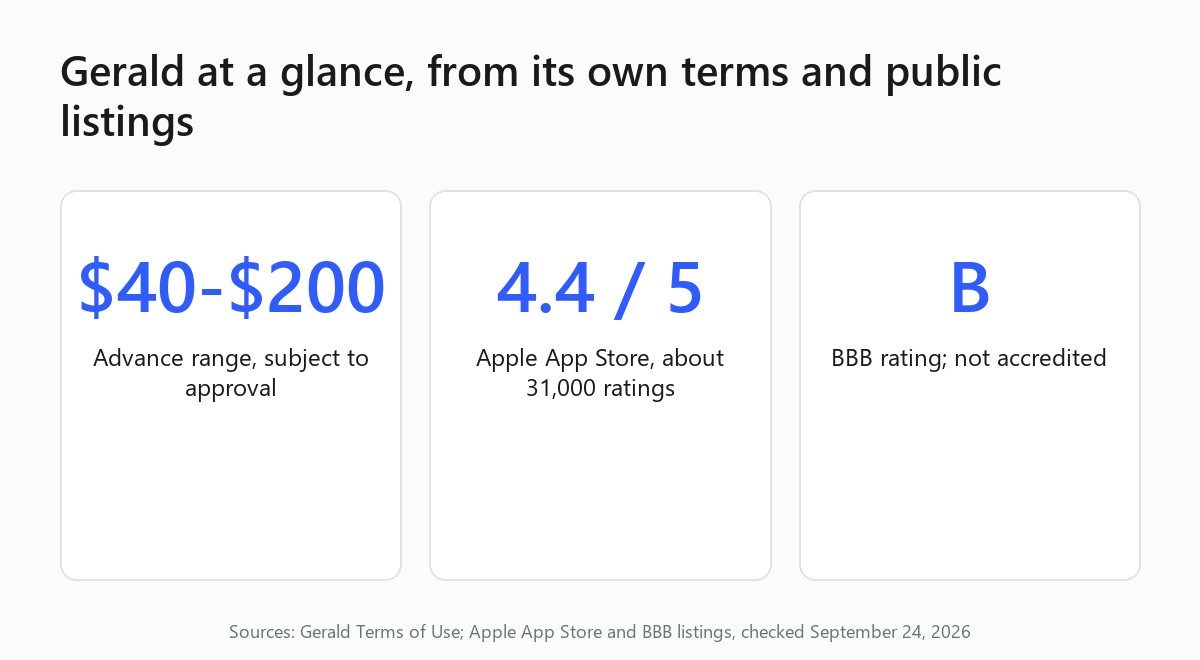
Gerald's advance range runs from $40 to $200, and approval is not automatic. The company's Terms of Use specify "amounts ranging from $40 to $200, contingent on Gerald's approval and company policies."
How does your limit move over time? Gerald's how-it-works page says advances "are reassessed upon repayment of the previous advance or after 30 days if unused." Notice what is missing from that sentence: any formula. Gerald does not publish a growth schedule the way some competitors do; how much, if any, a limit increases is left to Gerald's discretion.
Gerald has a standard transfer and may offer an expedited one. For a standard transfer, funds "should arrive into the account within 2-3 business days," per the company's Terms of Use. For anyone who needs cash by tomorrow, that timeline reads more like a scheduled deposit than an emergency advance.
The company also "may offer you an option to transfer the Cash Advance on an expedited basis," with funds arriving "within 30 minutes of your request," according to the same Terms of Use.
Here is the difference worth flagging: several competitors in this category are explicit that instant transfer costs extra. The Terms of Use state that no fee is required to obtain an advance, but they disclose no fee, or fee waiver, for the expedited option. Gerald has not disclosed a fee for it either way, so a reader comparing this to a competitor's clearly stated instant-transfer charge should treat Gerald's expedited option as an open question.
Repayment on a Gerald advance is set up as an automatic debit by default. That is standard in this category: your bank account is linked so Gerald can collect what you borrowed once it is due.
What is less standard is the language in Gerald's own Terms of Use: "you may be required to authorize a repayment for each Advance, however, you may revoke such authorization... You do not have an obligation to repay any Advance you receive." Gerald frames the debit authorization as something you can turn off rather than a fixed contractual requirement.
That is not the same as forgiveness. It means Gerald's own terms describe the debit as revocable, which is worth knowing before you link a bank account you cannot afford to have drained on a date you did not plan for.
Gerald does not run a credit check to approve an advance, according to the company's own how-it-works page. Instead of a credit pull, Gerald leans on the income and employment verification described below.
What Gerald does require, according to the company's own how-it-works page, is income and employment verification, plus a linked debit card. The same page states the company places a temporary hold of no more than $1 on that card for verification purposes, which releases immediately rather than sitting on your account. Gerald does not publish a minimum income threshold, so applicants have no way to know ahead of time whether their paycheck clears whatever bar Gerald applies.
If your pay is irregular or your work is gig-based, the lack of a published minimum means you find out where you stand only after you apply.
On the Apple App Store, Gerald holds a 4.4 out of 5 rating based on roughly 31,000 ratings, verified directly from the live listing. That is a solid score at real volume.
A Google Play rating could not be independently verified at the time of this review. Some other sites cite a Google Play figure for Gerald, but this review checked the live listing directly and could not confirm a number, so it is left out here rather than repeated from a secondary source.
The Better Business Bureau profile for Gerald Wallet tells a more mixed story: a B rating, with 120 complaints closed in the last three years and 367 total customer reviews on file, and the company is not BBB-accredited. Those figures are pulled directly from BBB's current profile.
Beyond the two rated platforms, a recurring theme shows up across review coverage from Finder, LendEDU, and CashAdvanceApps.com: complaints about overpriced Cornerstore items, shipping costs that eat into the advance amount, slow or non-delivery of the physical goods purchased to get access to a transfer, and difficulty reaching customer service. These themes were not independently itemized against a primary complaint transcript, so treat them as a pattern reported across those review sites rather than a verified count. Still, the pattern lines up with the mechanism described above: if the free transfer is gated behind a store purchase, the store experience itself becomes part of what you are actually paying for, in time and hassle if not in dollars.
Gerald is worth a look if you genuinely need a small amount, somewhere in that $40 to $200 range, and you are willing to make a purchase through Cornerstore to get access to the free bank transfer. Gerald also publishes no income floor at all, so you cannot check your odds before you apply.
It is a weaker fit if you want your entire advance in cash with no strings, or if you need more than $200. compareEWA's reviews of EarnIn, Brigit, and Dave cover apps that skip the store-purchase requirement entirely, charging instead a stated subscription or express fee you can see and decide against upfront. If you would rather know a specific dollar number than navigate a shopping requirement, one of those three apps is the more transparent trade. And if the expedited transfer matters to you specifically, remember that Gerald has not published a fee for it either way, so you will not know the full cost of speed until you are already inside the app.
For a broader sense of how apps in this category structure their pricing without a monthly membership, see compareEWA's roundup of apps that skip the subscription fee, and for a side-by-side on transfer speed, compareEWA's guide to how instant transfer speed compares across apps looks at how quickly money actually lands across the category.
If credit checks are your main concern, Gerald sits alongside other options covered in compareEWA's guide to apps that skip the credit check. If you are still deciding which product fits your situation, compareEWA's framework for comparing limits, costs, and speed walks through the same four criteria used in this review, applied across the category. And for a sense of how real users talk about these apps outside of app-store star ratings, compareEWA has also gathered what users say about cash advance apps on Reddit, which pairs well with the BBB and App Store figures cited above.
Gerald's "zero fees" pitch holds up for the advance itself. The transfer is where the trade shows up: pay in dollars through a competitor's stated instant-transfer fee, or pay in a shopping trip through a store that current reviews describe as a recurring source of complaints. Decide which one you would rather hand over before you link a bank account to either app.
Gerald approves advances between $40 and $200 based on income and employment verification, with no credit check. Moving that advance to your bank account without a fee requires first spending part of it through Cornerstore, Gerald's own store. Standard transfers take 2-3 business days; an expedited option can arrive in about 30 minutes.
Gerald requires income and employment verification and a linked debit card, which carries a temporary hold of no more than $1 that releases immediately. There is no credit check and no published minimum income threshold. To get access to a free bank transfer, users must complete a Cornerstore purchase as described in Gerald's how-it-works page and Terms of Use.
The advance itself carries no fee, per Gerald's Terms of Use. The bank transfer is free of a dollar charge, but only after a required Cornerstore purchase, which is a cost in time and shopping flexibility rather than a stated dollar fee. Gerald's terms do not clearly disclose whether the faster, expedited transfer option carries a fee.
Gerald advances range from $40 to $200, subject to approval. Limits are reassessed after you repay a previous advance or after 30 days of inactivity, but Gerald does not publish a formula for how much a limit increases.
Gerald holds a 4.4 out of 5 rating from roughly 31,000 ratings on the Apple App Store and a B rating from the Better Business Bureau, with 120 complaints closed over the past three years. Recurring complaint themes from Finder, LendEDU, and CashAdvanceApps.com involve Cornerstore pricing, shipping delays, and customer service access.

Chime's own SpotMe and MyPay fees and limits, plus which cash advance apps confirm Chime support on their own help pages.
Read article
We verified Money App's fees, limits, and BBB record so you know exactly what to expect before you link your bank account.
Read article
Comparing apps like Tilt cash advance? See how Earnin, Dave, Brigit, and MoneyLion stack up on fees, limits, and speed.
Read articleSee how the top earned wage access apps stack up on fees, limits, and speed. View the full ranking